Migration note, updated August 2026
Google has started moving Local Services Ads into Google Ads as pay-per-lead Performance Max, and the standalone LSA dashboard is being retired in phases. If your account has not migrated yet, the steps below still apply exactly as written. If it has, here is where each control now lives.
| In the old LSA dashboard | In Google Ads after migration |
|---|---|
| The LSA dashboard itself | Redirects to your campaign overview in Google Ads |
| Weekly budget | Daily average budget, your weekly figure divided by 7 |
| A bid or max cost per lead per job type | One campaign-level Target CPA for the whole campaign |
| Lead inbox | Goals, then Conversions, then Leads |
Phase 1 began August 1, 2026. Service-area businesses without a storefront are in the late 2026 wave, and everyone else follows in 2027. Read the full migration breakdown.
Published by Blue Grid Media • Updated for 2026 • 19 min read
You open your LSA dashboard Monday morning and see three new charges for leads that were obviously garbage. One was a robocall trying to sell you an extended car warranty (seriously). Another was someone asking about a service you have never offered. The third? Same guy who called twenty minutes earlier about the exact same job. And Google charged you full price for all three.
Sound familiar? Yeah, we hear this from contractors every single week. The frustrating part is not that bad leads happen. It is that most contractors never do anything about them. They see the charge, shake their head, mutter something unrepeatable, and move on. That passivity costs the average LSA advertiser hundreds of dollars per quarter in charges they could have gotten back.
To make it even more fun, Google completely overhauled the dispute system in July 2024. The old dispute button? Gone. The process now runs through an AI-driven lead rating system that works nothing like what most guides still describe. So if you are following advice from 2023, you are probably missing credits you are entitled to.
This guide breaks down exactly how the new system works, what types of leads qualify for credits, what does NOT qualify (this one trips up a lot of businesses), and a step-by-step process for getting every dollar back that you are owed. Whether you manage your own LSA or work with an agency, understanding disputes is one of the highest-ROI things you can do with your ad account. Fifteen minutes a week can put hundreds of dollars back in your pocket.
How the LSA Automated Credit System Works
Why LSA Lead Disputes Matter More Than You Think
Let us do some quick math. If you spend $3,000 per month on Local Services Ads and 6 to 7 percent of your leads are invalid, you are leaving $180 to $210 per month on the table by not disputing them. Over a year, that is $2,160 to $2,520 in charges for leads that should never have cost you a cent.
For larger accounts spending $5,000 to $10,000 monthly, the number climbs to $3,600 to $8,400 per year. That is not a rounding error. That is a technician's salary. That is a new van payment. For a smaller operation, that could be a full quarter of marketing budget just.. gone.
But here is the thing most people miss. The money recovery is only half the story. How you interact with the lead rating system directly influences the quality of leads Google sends you going forward. Rating every lead, both good and bad, trains Google's AI to understand what a good match looks like for your specific business. Pairing this with a strong review collection strategy compounds the effect. Skip this step, and the algorithm has nothing to learn from. You keep getting the same mix of junk and quality leads with zero improvement over time.
Understanding disputes is not optional maintenance. It is a core part of running LSA profitably. If you are spending money on LSA without tracking your cost per lead, disputes are where the leakage happens. And once you see how much money is sitting there waiting to be claimed, you will wonder why you did not start sooner.
Cost per lead is just CPC divided by conversion rate, which the free CPA calculator will do for you.
How the Old Dispute System Used to Work
Before July 2024, Google LSA had a pretty straightforward manual dispute process. You would go into your LSA dashboard, find a lead you believed was invalid, click the "Dispute" button, select a reason, and submit it for review. An actual human at Google would listen to the call recording, assess whether the lead met the criteria for a refund, and either approve or deny the dispute. Simple enough, right?
The old system had clear categories you could dispute under:
- Spam or bot calls: robocalls, automated messages, clearly not a real customer
- Wrong service requested: customer asking for something you do not offer
- Job type not serviced: a subcategory within your trade that you had not selected
- Geo not serviced: customer located outside your service area
- Duplicate lead: same customer calling about the same issue within a short window
- Bad contact information: wrong number, fake name, disconnected phone
Approval rates under the manual system were solid. Managed dispute services reported approval rates as high as 97 percent when disputes were filed correctly and promptly. The system worked, but it required manual effort for every single lead. And let us be honest, most contractors had better things to do than sit in a dashboard clicking dispute buttons all day. So most of them just.. did not.
Google retired this system because it did not scale. The volume of disputes was growing as LSA expanded into more industries and markets, and having humans review every single submission got expensive fast. The replacement is faster for Google, but it requires a different approach from you.
Old vs. New: How LSA Lead Disputes Changed
- ● Manual "Dispute" button
- ● You select a reason
- ● Google reviews manually
- ● 1-week turnaround
- ● Credits posted in 40 days
- ● "Job type not serviced" eligible
- ● "Geo not serviced" eligible
- ✓ "Rate This Lead" button
- ✓ AI pre-filters before charging
- ✓ 72-hour auto-review
- ✓ Credit decisions in 24 hours
- ✓ Credits posted in 30 days
- × "Job type not serviced" REMOVED
- × "Geo not serviced" REMOVED
The New System: Automated AI Credits (2024–2026)
In July 2024, Google replaced the manual dispute process with an automated, AI-driven credit system. The "Dispute" button was removed from the dashboard entirely and replaced with a "Rate this lead" button. This is not just a cosmetic change. The entire backend logic is different, and if you are still looking for that old dispute button, you are going to be looking for a while.
Here is how the new system works, step by step:
Stage 1: Pre-Charge Filtering
Before you are ever charged, Google's AI assesses incoming leads at the moment of initial contact. The system evaluates signals like caller behavior patterns, phone number reputation, call duration, and whether the query matches your listed services. Leads that the AI identifies as clearly invalid (robocalls, known spam numbers, extremely short calls) are filtered out before they hit your account. You never see these leads and you are never charged for them.
This pre-charge filtering is one of the reasons many advertisers have noticed a reduction in obvious spam calls compared to 2023 and earlier. The AI catches some junk before it reaches you. But it does not catch everything, which is why the next stages matter.
Stage 2: 72-Hour Post-Charge Review
For leads that pass the initial filter and result in a charge, Google's AI conducts a secondary review within 72 hours. During this window, the system re-analyzes the lead using additional signals, including call recordings and message content, to determine if the charge was valid. Some leads are automatically credited during this window without any action from you.
Stage 3: Lead Rating (Your Action)
This is where you come in. For any lead that was not automatically filtered or credited, you can rate it by clicking "Rate this lead" in your LSA dashboard. You select one of two dissatisfaction levels:
- Somewhat dissatisfied: the lead had issues but was partially relevant
- Very dissatisfied: the lead was clearly invalid or completely irrelevant
After selecting your dissatisfaction level, you choose a reason from a predefined list and have the option to add details. The more specific you are, the better. You must rate the lead within 30 days of receiving it. After that, the window closes permanently. No exceptions.
Stage 4: Credit Decision
Google's AI processes your rating and makes a credit decision. Credits are typically posted within 24 hours of your rating submission, though Google's official policy states they may take up to 30 days. If you have not received a decision after 72 hours, Google recommends calling their support line to follow up.
The 4 Stages of LSA Lead Credits
AI assesses every lead at initial contact. Obviously invalid leads, robocalls, wrong numbers, clear spam, are filtered out and never charged to your account.
Free, no cost to youLeads that were initially charged are automatically reassessed within 72 hours. If the AI identifies an issue, credits are issued without any action from you.
Automatic, no action neededYou rate the lead as "Somewhat" or "Very" dissatisfied, select a reason category, and add specific details about why the lead was invalid.
Your action requiredIf approved, credit appears in your account within 30 days. If denied, wait 72 hours then call Google Support to escalate. All decisions are final.
Final, all decisions bindingThis shift matters for how you approach your LSA ranking strategy overall. The AI is learning from your behavior, and consistent engagement with the rating system is now a real factor in the quality of leads you receive. Think of it like training a new dispatcher. The more feedback you give it, the better it gets at sending you the right calls.
Check your current position before you change anything with the free LSA Visibility Scanner.
What Qualifies for a Credit
Not every bad experience qualifies for a credit, and that is where a lot of contractors get tripped up. Google has specific categories of leads that are eligible for refunds under the new system. Knowing these categories inside and out is the difference between recovering your money and wasting time on ratings that will never result in credits.
Eligible Lead Types
| Lead Type | Description | Example |
|---|---|---|
| Spam calls | Robocalls, automated messages, bots, or solicitation calls that are not from real customers | Automated recording trying to sell insurance or SEO services |
| Wrong service requests | Customer is looking for a service category your business does not offer at all | Customer calls an HVAC company asking for roof repair |
| Duplicate leads | Same customer contacts you about the same issue within a short timeframe | Customer calls twice in 20 minutes about the same AC repair |
| Bad or fake contact info | Phone number is disconnected, wrong number, or the contact information is clearly fabricated | You call back and get a "number not in service" message |
| Sales calls | Someone trying to sell you something rather than requesting your services | Marketing company pitching website redesign services |
| Out-of-state callers | Customer is calling from well outside your defined service area and you cannot serve them | You serve Dallas and someone calls from Miami |
Quick Reference: What Qualifies for an LSA Credit
- Spam / robocalls
- Wrong service requested
- Duplicate leads (same customer, same issue)
- Fake / bad contact info
- Sales / solicitation calls
- Out-of-state callers
- Valid leads outside your hours
- Customers asking about services you offer
- Customer cancellations after booking
- Price shoppers / researchers
- Non-responsive customers (didn't answer your callback)
- General service listed but specific sub-type not offered
⚠ No Longer Eligible (removed 2024): "Job type not serviced" and "Geo not serviced", these categories were eliminated when Google shifted to AI-based filtering.
Each of these categories represents a lead where the customer either was not real or was fundamentally mismatched with your business. The common thread? There was never a legitimate service opportunity from the moment of first contact. You never had a shot at booking that job.
What Does NOT Qualify for a Credit
This is the section that frustrates contractors the most, because several scenarios that absolutely feel like bad leads are explicitly excluded from the credit system. We get it. It does not feel fair. But knowing what does not qualify will save you time and prevent the headache of submitting ratings that will never result in refunds.
Leads That Will Not Get Credited
- Valid leads outside business hours. If a customer calls at 9 PM on a Saturday and you do not answer, that is still a valid lead. The customer had a genuine need and attempted to contact you. Google will not credit this even if you missed the call.
- Customers asking for advice or quotes. A customer who calls to ask how much a water heater replacement costs is a valid lead, even if they never book. Google considers inquiry calls to be legitimate customer contact.
- Customer cancellations after booking. If a customer books an appointment through your LSA and then cancels before you arrive, that is not eligible for a credit. The initial contact was legitimate. (Yes, this one stings.)
- Price shoppers. Customers who call three different plumbers to compare prices and then choose someone else are valid leads. They were genuinely looking for the service you provide.
- Non-responsive customers. A customer who calls, leaves a message, and then ghosts your callback is still a valid lead. The initial contact was real, even if they vanished into thin air.
- General service listed but specific sub-type not offered. If you list "Plumbing" as a service but a customer calls about a specific sub-type like sewer line repair that you do not do, this is a gray area. If plumbing is listed on your profile, Google generally considers this a valid match, even if the specific sub-type is not something you handle.
Profile Settings vs. Credits: What Changed
The underlying principle is straightforward: Google credits leads where the contact itself was invalid. They do not credit leads where the contact was valid but the business outcome was poor. A customer who calls, asks a real question, and decides not to hire you is not a bad lead by Google's definition. It is a lead you did not convert. Tough to hear, but that is how the system sees it.
Step-by-Step: How to Rate a Lead and Request Credit
Here is the exact process for rating leads and requesting credits under the current system. Following this process consistently is the single biggest factor in how much money you recover. It is not complicated, but you do have to actually do it.
Step 1: Open Your LSA Dashboard
Log into your Google Local Services Ads dashboard. Navigate to the "Leads" section where you can see all incoming leads, their status, and charge information. Look for the "Charge Status" column. This tells you whether a lead was charged, credited, or is still under review.
Step 2: Identify the Lead to Rate
Find the lead you want to rate. Listen to the call recording or read the message transcript. Make a determination about whether the lead falls into one of the eligible credit categories listed above. Be honest with yourself here. Rating valid leads as invalid does not help you, and it may actually reduce the AI's confidence in your future ratings. Play it straight.
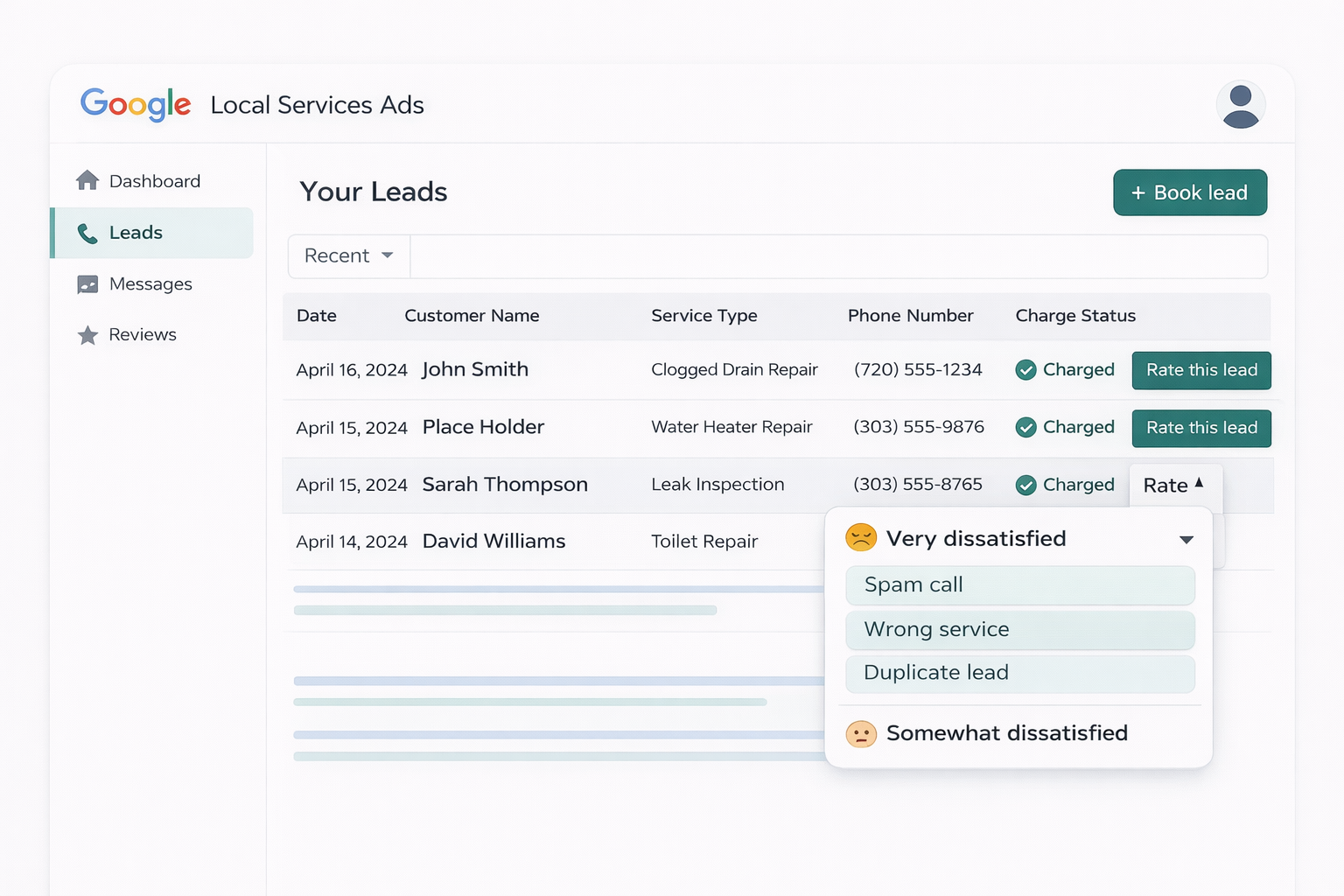
Step 3: Click "Rate This Lead"
Click the "Rate this lead" button next to the lead in question. Select your dissatisfaction level:
- Choose "Very dissatisfied" for leads that are clearly spam, duplicate, wrong service, or have fake contact info. This is the category most likely to result in a credit.
- Choose "Somewhat dissatisfied" for leads that had significant quality issues but were partially relevant. These can still result in credits but at a lower rate.
Step 4: Select the Most Accurate Reason
Choose the reason that most precisely matches why the lead was bad. Do not default to the same category every time. Accuracy matters because the AI uses your reason selection to assess whether a credit is warranted. Selecting "spam" for a lead that was actually a wrong-service request reduces your credibility with the system over time.
Step 5: Add Details (Do Not Skip This)
The details field is optional, but treating it as required significantly improves your credit rate. Write a brief, factual description of what happened. Examples:
- "Automated robocall. No human on the line. Call lasted 4 seconds."
- "Customer requested roofing repair. We are an HVAC company and do not offer roofing services."
- "Same customer as lead #12345 from earlier today. Duplicate call about the same AC issue."
- "Called back three times. Number is disconnected. Not a valid phone number."
Step 6: Submit and Track
Submit your rating. Then check back on the "Charge Status" column for that lead. Credits typically appear within 24 hours. If you do not see a credit decision after 72 hours, call Google LSA Support and reference the specific lead. Having the lead ID and your details ready makes the support call faster and more productive.
How to Maximize Your Credit Rate
The difference between businesses that recover 20 percent of their bad leads and those that recover a much higher percentage comes down to process discipline. Not talent, not luck, not some secret Google hack. Just consistency. Here are the practices that produce the best results.
8-Step System for Maximizing LSA Credits
1. Rate Every Single Lead, Good and Bad
This is the most important tip in this entire guide. Do not only rate the leads you want to dispute. Rate every lead you receive, including the ones you are happy with. When you mark a lead as "satisfied," you are training Google's AI to understand what a good match looks like for your business. The more data points the AI has, the better it gets at filtering out bad leads before they reach you and at sending you higher-quality matches.
Businesses that rate all of their leads consistently report better lead quality over time compared to those that only engage with the system when they have a complaint. Think about it this way: if you only tell the AI what you do not want, how is it supposed to know what you do want?
2. Act Within 24 to 48 Hours
While you technically have 30 days, acting quickly has practical advantages. You remember the details better. Your front desk staff can provide context while the call is still fresh. And faster rating gives the AI more timely data to work with. Set up a process where leads are reviewed and rated within 48 hours of receipt, not batched at the end of the month.
3. Select the Most Accurate Category Every Time
It is tempting to default to "spam" for everything because it feels like the strongest case. Do not do this. If the lead was a wrong-service request, label it as a wrong-service request. If it was a duplicate, label it as a duplicate. The AI evaluates your rating against the call recording and other signals. If your category selection does not match the evidence, it reduces the likelihood of a credit and may lower the AI's confidence in your future ratings.
4. End Bad Calls Quickly
When you realize a call is spam, a sales pitch, or a completely wrong-service request, end it politely but quickly. Longer call durations on bad leads can make them look more like legitimate conversations to the AI, which may reduce your chances of getting a credit. A 10-second spam call is easier for the system to validate as spam than a 3-minute call where you engaged with a sales pitch.
5. Train Your Phone Staff
Your receptionist or phone answering team is the front line of your dispute process. Train them to note the following for every LSA call:
- Was the caller a real person or a recording?
- Did the caller request a service you actually offer?
- Was the caller in your service area?
- Was this a repeat call from the same person?
When this information is captured at the time of the call, rating leads becomes a two-minute task instead of a ten-minute investigation.
6. Review Your LSA Profile Settings Regularly
If you are consistently getting leads for services you do not offer, the solution is not just disputing them. It is fixing your profile. Review your listed job types, service areas, and business hours at least quarterly. Tightening these settings reduces the volume of mismatched leads, which means fewer disputes needed in the first place. This is especially important now that "job type not serviced" and "geo not serviced" are no longer standalone credit categories. Fix it at the source, not after the fact.
7. Call Google Support After 72 Hours
If you rated a lead as dissatisfied, provided details, and have not seen a credit decision after 72 hours, call Google LSA Support. Have the lead ID ready. Explain the situation factually. Support agents can escalate credit reviews and often resolve pending cases on the spot. This step alone recovers credits that would otherwise disappear into the system.
8. Check the "Charge Status" Column Weekly
Make it a habit to review the Charge Status column in your leads dashboard every week. This column tells you whether each lead was charged, credited, or is pending review. Tracking this data over time helps you spot patterns. For example, if you are seeing a spike in spam calls from a particular area code, that might indicate a larger issue worth raising with Google Support.
Common Mistakes Contractors Make with Disputes
After managing LSA accounts across dozens of home service businesses, we see the same mistakes over and over. The good news? They are all easy to fix once you know what to watch for.
Mistake 1: Never Disputing Anything
This is by far the most common issue. The majority of LSA advertisers never rate a single lead. They treat the charges as a cost of doing business and move on. Over the course of a year, this can mean thousands of dollars in unrecovered charges for leads that were clearly invalid. If you are spending money on LSA, lead rating should be part of your weekly operations, not something you "get around to eventually."
Mistake 2: Only Disputing Bad Leads
Rating only the leads you are unhappy with gives the AI a skewed data set. It sees you complaining about some leads but has no positive signal about what a good lead looks like for your business. Rating all leads, both satisfied and dissatisfied, gives the algorithm the full picture it needs to improve your lead quality over time.
Mistake 3: Waiting Until the End of the Month
Batching all your ratings at the end of the month means you are working from memory, which leads to less accurate descriptions and category selections. It also delays the AI's learning. We get it, you are busy running a business. But rate leads within 24 to 48 hours for the best results. Your future self (and your bank account) will thank you.
Mistake 4: Using the Wrong Category
Labeling every bad lead as "spam" when some were actually wrong-service requests or duplicates undermines your credibility with the system. The AI compares your category selection against its own analysis of the call. Mismatches reduce your credit approval rate and may reduce the weight the AI gives to your future ratings. Call it what it actually is.
Mistake 5: Disputing Valid Leads
Trying to dispute every lead that did not convert into a booked job is counterproductive. Price shoppers, after-hours callers, and customers who change their mind are all valid leads by Google's criteria. Disputing them wastes your time, will not result in credits, and may flag your account as one that submits low-quality ratings. Save your disputes for the leads that genuinely deserve them.
Mistake 6: Ignoring Profile Settings
If you are getting a high volume of leads for job types you do not service or locations you do not cover, the root cause is usually your LSA profile settings, not the leads themselves. Fix the source of the problem rather than relying on disputes to clean up the symptom. Review your LSA profile and ranking factors to make sure your settings match your actual business.
How Dispute Behavior Affects Your Ranking
Google has stated that disputing leads does not directly penalize your LSA ranking. You will not lose position in the ad pack because you rated a lead as dissatisfied. That is the good news. However, your overall engagement with the lead system does influence your performance in indirect but meaningful ways.
Lead Quality Feedback Loop
Every time you rate a lead, you are feeding data into Google's AI. Over time, this data shapes which leads the AI sends you. Businesses that consistently rate leads, both positively and negatively, tend to see improved lead quality because the AI develops a clearer model of what a good match looks like for that specific business.
On the flip side, businesses that never rate leads give the AI no feedback to work with. The algorithm just keeps sending the same broad mix of leads without any refinement. It is like never telling your team what they are doing right or wrong and then wondering why nothing improves.
The LSA Lead Quality Feedback Loop
Responsiveness and Booking Signals
Your responsiveness to leads is a confirmed LSA ranking factor. When you receive bad leads and do not answer them (because they are spam or irrelevant), your answer rate drops. Lower answer rates signal to Google that you are less responsive, which can hurt your ranking. This is another reason to answer all LSA calls promptly, even if only to identify them as bad leads quickly so you can rate them and maintain your responsiveness metrics.
Budget Efficiency
Credits from successful disputes go back into your budget, allowing your ads to run longer within the same billing period. This means more exposure, more valid leads, and better overall performance metrics. Think of dispute credits not just as refunds but as additional ad spend that you have already paid for.
The businesses that see the best long-term LSA performance are the ones that treat lead rating as a core operational practice, not an occasional complaint process. Combined with strong ranking factor optimization and a clear understanding of what you should actually be paying per lead, dispute management rounds out a complete LSA strategy.
See the real numbers for your trade
Plug in your industry, budget, and close rate. Our calculator shows your projected leads, cost per booked job, and ROAS.
LSA Lead Dispute FAQs
How long do I have to dispute an LSA lead?
You have 30 days from the date the lead was received to rate it and request a credit. After 30 days, the lead is locked and cannot be disputed. Best practice is to rate leads within 24 to 48 hours while the details are still fresh and your records are accurate.
What happened to the dispute button in Google LSA?
In July 2024, Google replaced the manual dispute button with a "Rate this lead" button and an automated AI-driven credit system. Instead of submitting formal disputes, you now rate leads as "somewhat dissatisfied" or "very dissatisfied," select a reason, and Google's AI decides whether to issue a credit. The new system is faster but gives you less control over individual outcomes.
What percentage of LSA disputes get approved?
Managed dispute services report approval rates as high as 97 percent. However, businesses using the self-service lead rating system without a structured process typically see only about 20 percent of their bad leads result in credits. The difference comes down to consistency, speed, and selecting the correct dispute categories.
Can I dispute an LSA lead for a customer who never showed up?
No. Customer no-shows, cancellations after booking, and non-responsive customers after initial contact are not eligible for credits. Google considers these valid leads because the customer made genuine initial contact. Credits only apply to leads that were invalid from the start: spam, wrong numbers, duplicate contacts, or requests for services you do not offer.
Does disputing LSA leads hurt my ranking?
Not directly. Google has stated that disputing leads does not penalize your ad ranking. However, your overall lead engagement behavior does matter. Consistently rating leads, both good and bad, trains Google's AI to send you better-matched leads over time, which indirectly helps your performance metrics and ranking signals.
How much money can I get back from LSA lead disputes?
Most businesses recover between 6 and 7 percent of their total LSA spend through credits when they dispute consistently. For a business spending $3,000 per month, that translates to roughly $200 per month or $800 or more per quarter. Businesses that use managed dispute services or follow a disciplined weekly process tend to recover even more.
Bottom Line
Google's LSA lead dispute system has changed significantly, but the core principle has not: you should never pay for leads that were not real opportunities. The shift from manual disputes to automated AI credits means your approach needs to be different. Consistent lead rating, accurate category selection, and timely action are now the levers that determine how much money you recover.
The businesses that do this well recover 6 to 7 percent of their total spend in credits, which compounds into thousands of dollars over the course of a year. More importantly, their lead quality improves over time because the AI learns from their feedback. The businesses that ignore the system? They absorb every bad charge and never see the quality improvement that consistent rating delivers.
Build a weekly lead review habit. Rate every lead, good and bad. Act within 48 hours. Use the correct categories. Add details. Follow up with support after 72 hours if a credit does not appear. That is the entire system, and it works. No magic tricks, no secret hacks. Just consistency.
If you want help implementing a lead dispute process that actually recovers your money, or if you would rather have a team handle this for you as part of full LSA management, that is exactly what we do at Blue Grid Media. We manage the entire LSA lifecycle, from profile optimization to lead quality monitoring to credit recovery.
Stop Paying for Bad Leads
Get a free LSA audit and find out how much you could recover through proper dispute management. No obligation, no sales pitch. Just a clear breakdown of your account.
Book Your Free ConsultationCredit recovery data reflects aggregated results from managed LSA accounts and published industry benchmarks as of 2024–2026. Actual credit rates vary by dispute category, account history, and AI evaluation. Google's dispute policies are subject to change. Blue Grid Media specializes in LSA management and optimization for local service businesses.
More on Google Local Services Ads
Part of the BGM Local Services Ads library. Pair this with the master pillar and the deep-dive guides: