Published by Blue Grid Media • Updated for 2026 • 15 min read
For plumbers, phone calls are revenue. Paid search can reliably produce those calls, but only if you pick the right platform, structure campaigns correctly, and run the business-side follow-up. This playbook walks you through a practical, step-by-step approach to using Google Local Services Ads (LSA) and Google Search Ads together so you get the highest-quality leads in your local market at the lowest realistic cost.
Plumbing LSA Deep Dive Series
This guide covers the full plumbing LSA playbook from setup to dual-platform strategy. For deeper analysis on specific topics, each page below focuses on one angle that would take too long to cover here:
Plumbing LSA Resources
TL;DR: Quick Verdict
Start with LSA if you need reliable, high-intent calls fast. Layer in Google Search Ads once LSA demonstrates consistent volume and your business can handle more leads. Use both for market coverage: LSA gives quality and immediacy; Google Ads gives scale and control.
| Feature | Local Services Ads (LSA) | Google Search Ads |
|---|---|---|
| How you pay | Pay per lead (calls/messages) | Pay per click |
| Lead intent | High (ready to hire) | Varies (research to ready) |
| Setup difficulty | Moderate (verifications required) | Higher (campaign management skills) |
| Best for | Immediate staffing/installation jobs | Scaling and demand capture across intent stages |
See the real numbers for your trade
Plug in your industry, budget, and close rate. Our calculator shows your projected leads, cost per booked job, and ROAS.
Break-even ROAS is 1 divided by your margin. The free ROAS calculator works it out from your figures.
What Are Local Services Ads (LSA)?
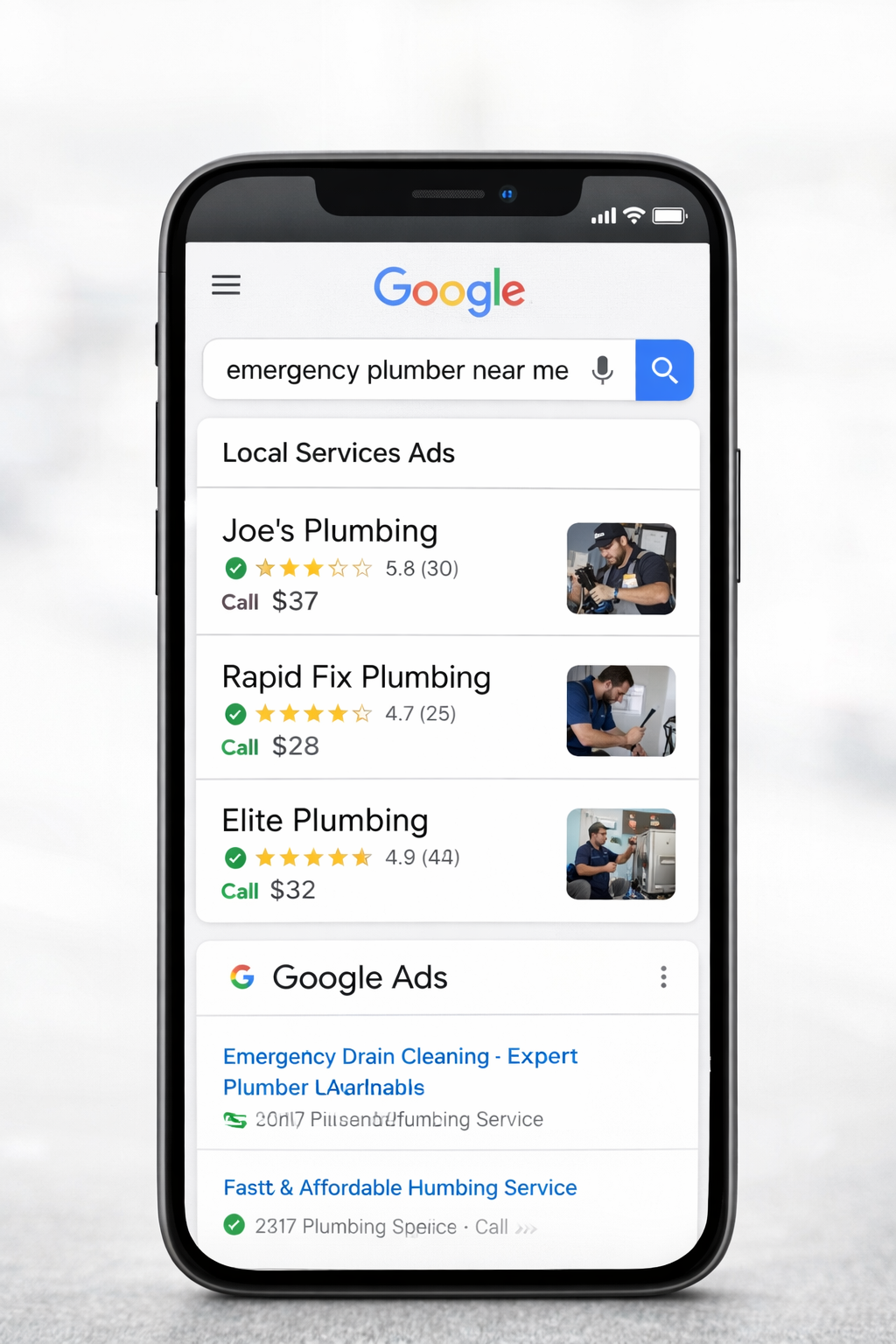
Google's Local Services Ads are a pay-per-lead product that appears at the very top of search results. LSA listings show your business name, star ratings, reviews, and, for qualifying businesses, the Google Verified badge. Users click to call or message directly from the ad. When homeowners in your area search for emergency or urgent plumbing help, your listing is the first thing they see.
For plumbers this is extremely valuable: many searches for emergency or urgent repairs convert instantly into calls. The LSA model shifts risk away from pay-per-click wastage and toward paying for actual contact attempts, provided those calls are real and qualified.
What Are Google Search Ads for Plumbers?
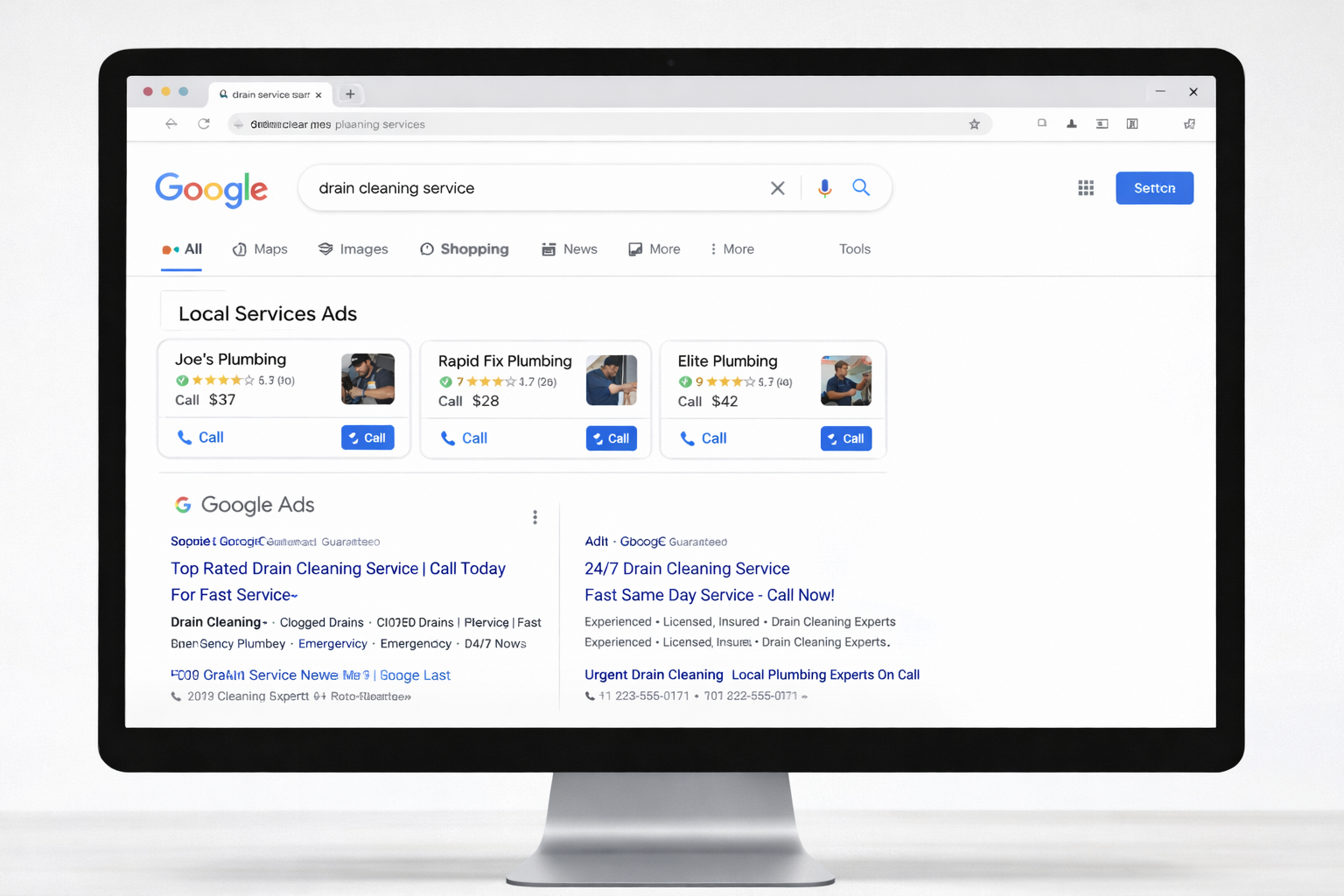
Google Search Ads let you bid on keywords, control your ad text and extensions, and send clicks to landing pages. You pay for clicks and need tracking to measure whether clicks create calls or booked jobs. With the right structure, Search Ads can scale faster and capture traffic across a wide intent spectrum, from research queries to emergency searches in your local service area.
But Search Ads require active management: keyword selection, negative keywords, ad copy tests, conversion tracking (phone calls), and ongoing bids. Left unmanaged, Search Ads can attract price shoppers, out-of-area clicks, and low-intent visitors.
Side-by-Side: Which Platform Wins, and When
Use this decision flow:
- If you need immediate qualified calls and have a small team: Start with LSA.
- If you already get consistent LSA volume and want more leads: Add Google Search Ads to scale.
- If you have a marketing budget and staff to respond quickly to calls: Run both and optimize for cost-per-lead across platforms.
The practical split: use LSA to dominate the high-urgency searches, burst pipes, drain clogs, water heater failures. These are the customers searching near them with immediate hiring intent who call whoever shows up first. Use Google Search Ads for the rest of the funnel: homeowners comparing water heater replacement quotes, property managers looking for a go-to plumber, someone researching bathroom remodel costs before committing. LSA won't reach those customers. Search Ads will.
The mistake most plumbing companies make is thinking these are competing budgets. They're not. A dollar in LSA and a dollar in Google Ads are solving different problems. When both are optimized, your blended cost per booked job is lower than running either one alone at the same total spend, because you're covering the full range of customer intent rather than just one slice of it. For the full keyword strategy, campaign architecture, brand-authorized bidding (Rinnai, Navien, Kohler, Moen), seasonal patterns, and fixture margin economics on the Search Ads side, see our dedicated Google Ads for Plumbers playbook.
The 6-Step LSA Setup Checklist (Copy & Paste)
Follow these steps to get LSA live and maximizing calls in your local market:
- Create your LSA profile, include accurate business name, service areas, hours, and a professional description.
- Gather insurance & background documents. Google requires proof of licensing and insurance for verification. Have digital copies ready.
- Pass background checks, owners and technicians may need checks; start the process early (this is the slowest step).
- Optimize your Google Business Profile, your GBP reviews feed directly into your LSA listing. Make sure your profile is complete with accurate hours, service area, photos, and a detailed description.
- Optimize reviews, request recent reviews and respond publicly to them. Aim for 4.5+ stars for best conversion impact.
- Set your availability & budget, choose how many leads you want per week and budget accordingly (Google offers lead limits).
- Implement call handling & dispute process, log calls, categorize leads (booked job vs. spam), and dispute in LSA dashboard if necessary.
Before you go live, make sure you understand the key LSA ranking factors, profile completeness, review velocity, and response speed are all signals Google weighs in the auction that determine where your listing appears in local search results.
To see where you actually sit in the LSA pack right now, run the free LSA Visibility Scanner.
The 8-Step Google Search Ads Starter Blueprint for Plumbers
When you add Search Ads, use this blueprint to avoid wasted spend:
- Organize campaigns by service & intent, e.g., Emergency Plumbing (Branded), Drain Cleaning (Service), Water Heater Repair (Service), Service Area Targeting (City/Zip level).
- Create tightly themed ad groups, each ad group should target 6–12 closely related keywords to keep relevancy high.
- Use exact & phrase match with negatives, start with phrase and exact to reduce junk; add aggressive negative keywords (jobs, free, DIY, parts) as you see search queries.
- Ad extensions, call extensions, location extensions, sitelinks for pricing/financing/page anchors.
- Landing pages, each service should have a focused landing page with phone number at top, clear CTA, trust signals (reviews, badges), and a simple contact form.
- Call tracking, use Google forwarding numbers or a call-tracking provider and ensure calls are recorded to measure true conversions.
- Conversion tracking & attribution, set up GA4 + Google Ads conversion tracking and import goals so you can optimize toward calls or booked appointments, not clicks.
- Bid & budget rules, use manual bidding early to collect conversion data, then test automated bidding once conversion signals are strong (ROAS/Maximize conversions with target CPA).
Mini Case Study. Realistic Example You Can Model (Numbers You Can Use)
This is a hypothetical but realistic example you can use as a template for forecasting.
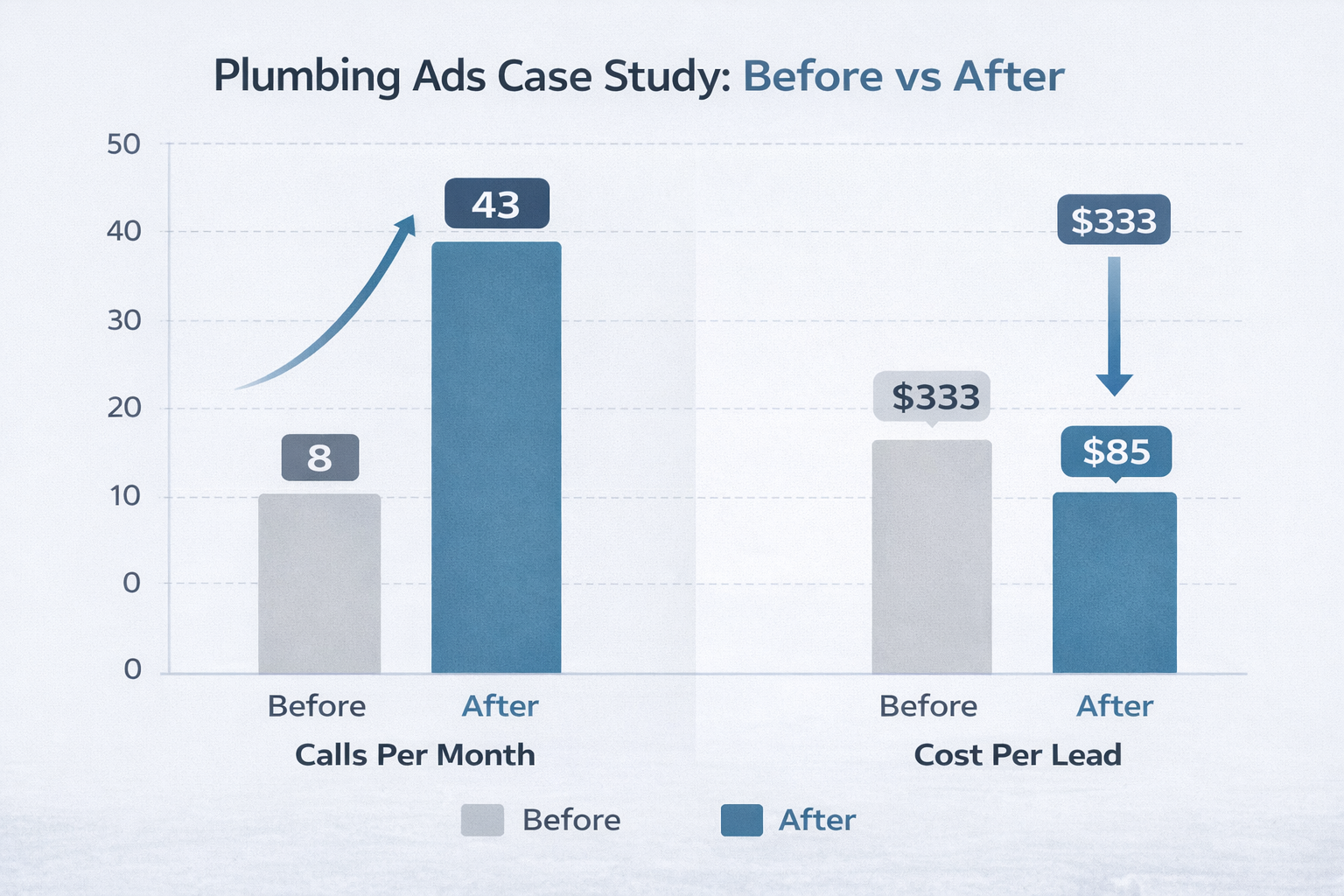
Before (Month 0)
- Monthly Google Ads budget: $2,000
- Average CPC: $25
- Clicks: 80
- Phone calls tracked from site: 6 (7.5% conversion from click to call)
- Cost per lead (CPL): $333
- Booked jobs per month: 2 (close rate 33%), average job value: $400 → Revenue = $800
After (Optimized, Month 3)
- Budget: $2,000 (same spend)
- Improvements made:
- Added LSA and redirected emergency intent to LSA
- Tightened negative keyword list and ad groups
- Improved landing pages with phone-first CTA
- Added call tracking and quick-response SOPs
- Google Ads clicks reduced (lower waste), but high-intent clicks rose to 60
- Calls tracked: 18 (30% conversion from click to call)
- LSA leads (paid per lead): 25 leads at $50 CPL → $1,250 spend
- Combined leads: 43
- Booked jobs per month: 14 (assume 33% close rate total) → Revenue = 14 × $400 = $5,600
- Combined CPL (weighted): approx $85
Result: Same paid budget allocation (with some rebalanced to LSA) produced more booked jobs and far lower blended CPL. This is how LSA + refined Search Ads work together. LSA captures immediate hires from customers searching near them while improved Search Ads capture high-intent researchers and non-emergency demand.
Want to run the numbers for your plumbing company? Run the numbers for your own market with our free plumbing LSA ROI calculator.
Common Mistakes Plumbers Make (And Exactly How To Fix Them)
- Not enabling drain/sewer/water heater/gas line services: Most plumbers check the basics and skip high-value categories. A water heater install at $3,500-$5,000 is far more profitable than a $150 drain call, but if "water heater installation" isn't enabled in your LSA profile, you never see those leads. Go through the full job type list and turn on everything you're licensed to do, especially sewer line repair, gas line work, and tankless water heater installation.
- Burning budget on low-value drain calls when you want water heater installs: Not all plumbing leads are created equal. If most of your LSA budget goes to $150 drain clearing calls when you really want $4,000+ water heater replacements and repiping jobs, your service type configuration and budget allocation are working against you. Review which job types are eating most of your spend and adjust accordingly.
- No 24/7 phone coverage for emergency leads: Plumbing is a 24/7 emergency trade. A burst pipe at 2am generates the highest-intent, highest-value call you'll get all week, and the homeowner is calling the first plumber who picks up. If you're sending those calls to voicemail, you're paying for leads and handing the jobs to competitors. Use call forwarding to an after-hours answering service or rotate on-call techs to cover nights and weekends.
- Not disputing wrong-service leads: Plumbing LSA profiles regularly receive calls from people looking for HVAC services, electrical work, or general handyman jobs. These are disputeable leads, log into your dashboard and file disputes for every call that isn't actually a plumbing request. Google issues credits for valid disputes, but only within a set time window. For more on the dispute process, see our guide to why LSA leads get disputed.
- Ignoring the commercial plumbing market: Many plumbers run LSA thinking it's only for residential emergency calls. Property management companies, restaurants, office buildings, and retail spaces all search for plumbers on Google. Make sure your profile description and job types speak to commercial work, backflow testing, grease trap service, commercial water heater installation, not just residential drain calls.
If calls slow down after launch despite a technically sound setup, our LSA no-calls troubleshooting guide covers the 12 most common causes, from incomplete verification to service area mismatches, and the exact fix for each one.
How To Track Results Properly
Plumbing has a wider job-value spread than almost any other trade on LSA. A $150 drain clearing and a $4,000 water heater install are fundamentally different businesses, and your tracking needs to reflect that. Here's the tracking framework that actually moves the needle for plumbing companies.
- Separate emergency vs. planned repair vs. install leads. Tag every LSA lead by type: emergency call (burst pipe, sewer backup, no hot water), planned repair (slow drain, running toilet, faucet replacement), or install/project (water heater replacement, repipe, bathroom rough-in). Each category has different close rates, different average ticket values, and different follow-up requirements. Treating them all as "plumbing leads" in a single bucket tells you nothing useful.
- Calculate cost per booked job by service type. A $50 lead that books a $150 drain call has completely different economics than a $50 lead that books a $4,000 water heater install. Track your CPBJ separately for drain/sewer, water heater, general repair, and project/install categories. This tells you exactly where your LSA spend is producing the strongest returns, and where you might need to adjust job type settings.
- Monitor after-hours conversion rates. Plumbing emergency calls peak between 6pm and 8am. Track how many after-hours leads your team actually answers, how many convert to booked jobs, and what the average ticket value is on those calls. After-hours leads typically have the highest conversion rates and the highest job values of any plumbing lead category, if you're answering them.
- Track which zip codes produce the highest-value jobs. Not all areas in your service territory produce equal returns. Some zip codes generate mostly $150 service calls while others consistently produce $3,000-$5,000 install jobs. Once you have 60-90 days of data, review your lead quality by geography and consider tightening your service area around your most profitable zones. For more on understanding lead volume expectations by market, see our dedicated guide.
Review this data weekly, not monthly. The after-hours answer rate, the emergency-to-install lead ratio, and the zip code performance patterns are all things that shift week to week. Plumbing companies that review and adjust weekly consistently outperform those that wait for monthly reports because they catch coverage gaps and budget misallocations before they compound.
Plumbing LSA FAQs
What's the best way to handle emergency calls from LSA?
Emergency plumbing calls, burst pipes, sewer backups, gas leaks, no hot water, are the highest-value leads you'll get from LSA. The key is answering within two rings, 24/7. Set up call forwarding to an on-call technician or a live answering service for after-hours. Have a quick intake script ready: get the address, the problem, and dispatch immediately. Customers who call at midnight because their basement is flooding will leave a 5-star review when you show up fast, and that review velocity is what keeps your LSA ranking strong. For a deeper look at what drives LSA ranking, see our full guide.
How do water heater leads compare to drain cleaning leads on LSA?
They're not even in the same category economically. A drain cleaning lead at $50 CPL that books a $150 job gives you a 3x return on that single visit. A water heater replacement lead at the same $50 CPL that books a $3,500 install gives you a 70x return. The smart play is making sure water heater installation, tankless water heater service, and water heater repair are all enabled as separate job types in your LSA profile so Google surfaces your listing for those higher-value searches.
How should I handle commercial vs. residential plumbing leads from LSA?
Commercial leads take longer to close but the contract values are dramatically higher. A property management company that needs a go-to plumber for a 50-unit building is worth tens of thousands per year. When a commercial lead comes through LSA, have a different follow-up process: send a professional email recap after the call, offer a site visit, and present a maintenance agreement. Residential leads can close on the first call; commercial leads usually require a second touchpoint.
How long does plumbing license verification take for LSA?
The background check and license verification process typically takes one to three weeks for plumbing companies. The background check itself is the bottleneck. Start it on day one before you do anything else. Have your state plumbing license, general liability insurance certificate, and any required bonding documentation ready in digital format before you begin the application. Delays almost always come from missing or expired documents, not from the background check itself. Learn more about the full process in our step-by-step verification guide.
What's a good starting budget for a plumbing company on LSA?
Most plumbing companies should start with a weekly budget that targets 15 to 25 leads. In markets where leads run $40-$60 each, that's roughly $600-$1,500 per week or $2,400-$6,000 per month. Start with Maximize Leads bidding and avoid setting a Max Per Lead cap in the first 60 days, you need data before you can optimize. After 60-90 days of lead data, you'll know exactly which service types and zip codes are producing the best returns and can adjust your budget allocation from there. For a full breakdown of LSA pricing by industry, see our cost guide.
Should I run LSA and Google Ads together as a plumber?
Yes. LSA captures the "plumber near me" and "emergency plumber" searches from customers with an active problem right now. Google Ads captures the traffic LSA cannot reach: homeowners researching water heater replacement options, comparing tankless vs. tank models, looking for bathroom remodel plumbing contractors, or searching for commercial plumbing services. The combination is especially powerful because plumbing has such a wide job-value range. LSA handles the emergency and routine calls while Google Ads targets the high-value research and project keywords. For a detailed comparison of both platforms, read our Google Ads vs. LSA breakdown for contractors.
Downloadable Assets
Weighing LSA + Google Ads against other plumbing lead channels? See our full plumbing leads channel comparison, with real 2026 CPLs for LSA, Google Ads, GBP, property manager contracts, insurance/restoration partnerships, pay-per-call services, and shared lead aggregators like Angi.
Conclusion & Next Steps
Plumbing is one of the highest-ROI industries for Local Services Ads, and it comes down to three things that set it apart from most other trades: 24/7 emergency demand that drives high-intent leads around the clock, strong average ticket values that range from hundreds to thousands per job, and a customer base that makes booking decisions in minutes, not days. The plumber who answers the phone first at 2am wins the $3,500 water heater install, and the 5-star review that comes with it.
What you keep from that ticket matters more than the ticket. Run one through the free contractor profit margin calculator.
Phone coverage is the make-or-break factor. Every missed call is a booked job going to a competitor who picked up. If you do nothing else after reading this playbook, set up after-hours call forwarding before your next LSA lead comes in. Then enable every service type you're licensed for, start collecting reviews after every job, and track your leads by service category so you know exactly where your best returns are coming from.
Or use our free LSA setup checklist and run the setup yourself.
Results vary by market, seasonality, and follow-up processes. Blue Grid Media can audit your current setup and show where you're losing calls and money, book a free review.
More for plumbing operators
Pair this with the rest of the plumbing operator series. Each guide covers a different angle on growing a plumbing company through paid search: